HELP ARTICLE
Onzi home screen: your World Cup 2026 sticker app quick-start guide
A walkthrough of the Onzi home screen so you can find your way fast: album progress, team ranking, duplicates, and the door to face-to-face trades.
4 min read · Updated June 7, 2026
What you see on the Onzi home screen
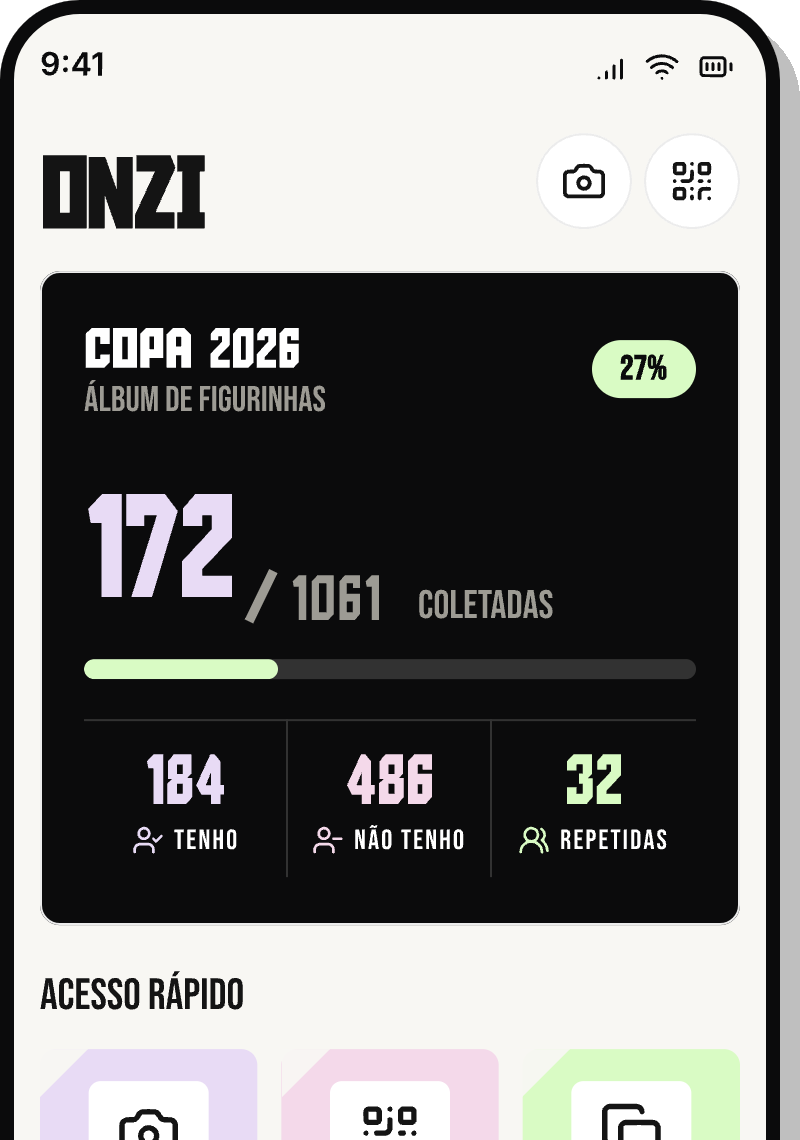
The Onzi home screen is your collection HQ. In one place you keep an eye on what matters day to day: how much of the album you've filled, how each team is coming along, how many duplicate stickers you have to trade, and where to start a trade with a friend.
There's nothing to memorize. The whole point is that one glance tells you where you stand and what to do next. Here's a quick tour of each part so you can get your bearings.
Album progress
Progress shows how much of your collection is complete. It's the first thing worth a look when you open the app: it ticks up every time you add a new sticker, and watching the album inch toward the finish line is genuinely satisfying.
Use progress to stay motivated and gauge your pace:
- See how many stickers you have against the album's total.
- Watch the number climb each time you scan and add a sticker.
- Use it as a gauge for whether it's time to line up a trade with friends.
Team ranking
The ranking sorts your collection by country and shows which teams are nearly full and which still have plenty of gaps. It's the fastest way to spot that, say, your favorite team's page is almost there — or that another nation has a long way to go.
Tap a team to see its details and exactly which stickers are still missing. That way you aim your effort where it actually counts instead of trying to fill everything at once.
Duplicates: your trading currency
Duplicates are the stickers you have more than one copy of — a collector's trading currency. In Onzi they're grouped by team, so it's easy to see which countries you have spares of and how many of each.
Keeping your duplicates current is what makes trades go smoothly. Before you meet up with a friend, take a look here so you know everything you have to offer.
Where to start a trade
The way into trading is reachable from the home screen too. That's where you open a face-to-face trade session: one of you shows the QR Code, the other scans it, and Onzi cross-references both collections to point out the perfect matches right away — what each of you has that the other needs.
Want the full step-by-step? See the article dedicated to QR Code trades. From the home screen, all you need to know is that it starts from this shortcut — no account, no internet required.